
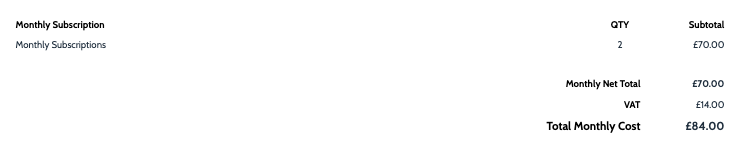
The subscription section shows the types of subscriptions and the total amount. It includes any subscriptions linked to a product. You can customise it to show or hide specific pricing details as needed.
1. Select a Quote:
- Choose the quote you want to work on.
2. Go to Proposal View:
- Navigate to the ‘Proposal View’ to edit your proposal.
3. Go to ‘Edit’
- Click on ‘Edit’ to start modifying your proposal.
4. Add a Section:
- Add a section titled ‘Subscription’ from the available options.
5. Add Your Preferred Section:
- Add any additional sections you need.
6. Move to Preferred Location:
- Move the newly added section to your preferred location, as it will initially fall to the bottom.
7. Finish Editing:
- Click ‘Finish Editing’ to save your changes.
Once you’re satisfied, save your changes to overwrite the template. These updates will automatically apply every time you use the template for future quotes.